Roblox Catch a Plane: Grip Upgrades and New Worlds Guide
Learn the official strength, glove, gear-box and trophy loop, with a practical first-session plan and parent tips for purchases and account safety.
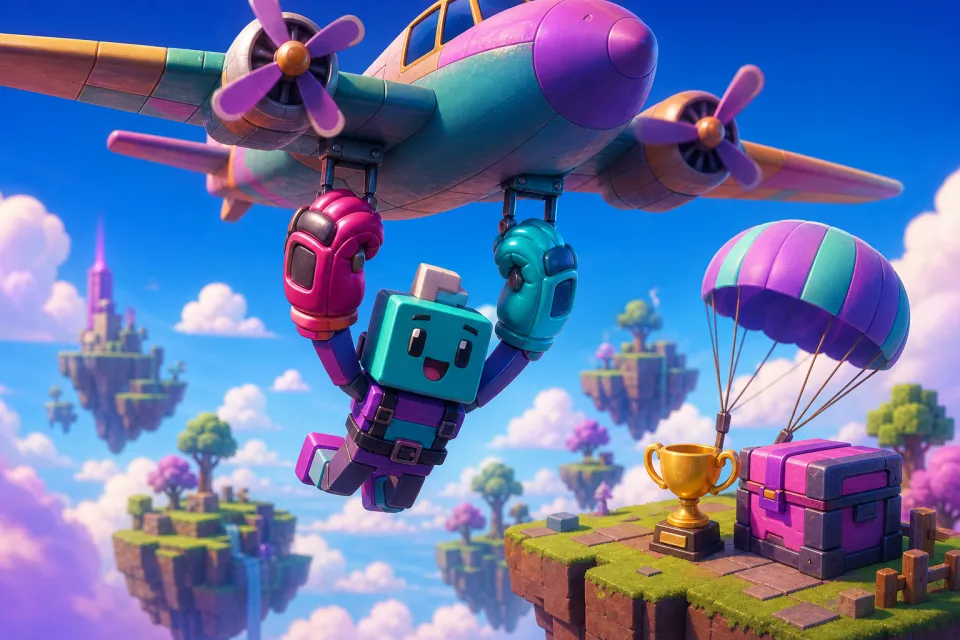
Getting started in Catch a Plane means learning a simple progression loop: train strength, improve your gloves, explore gear boxes, and reach the finish for trophies that unlock new worlds. Your first goal should be understanding one complete attempt—not chasing the biggest aircraft immediately.
This walkthrough follows the official Roblox listing, checked November 3, 2026. It explains the advertised systems and offers a cautious beginner plan, rather than claiming tested upgrade formulas. The listing does not specify exact controls, item prices, equipment statistics or world-unlock requirements.
1. Start with one practice attempt
The premise is deliberately silly: jump, grab a passing plane and try to stay attached as it carries you through the sky. The developer explicitly warns players not to attempt this in real life. Treat the airport action as cartoon fantasy, not something to copy.
Open the official listing linked above rather than choosing a similarly named search result. During this check, its public page displayed a message saying there were no running experiences. That observation does not establish a permanent shutdown; check the live page before planning a session.
If you can enter, use this first-session checklist:
- Read the on-screen instructions. Follow the controls shown for your device rather than assuming a keyboard shortcut or touchscreen gesture.
- Locate the progression menus. Look for training, gloves, equipment and world information before spending anything.
- Make one learning attempt. Concentrate on understanding the grab and what happens when the attempt ends.
- Choose one improvement. Decide whether your next experiment should focus on training or an available upgrade.
Do not worry about matching another player's progress. A useful first session ends with you knowing what to try next, even if you have not reached a new world.
2. Train strength and upgrade your grip
According to the official listing, strength training helps you hold on longer, while upgraded gloves let you grab faster and heavier planes. Think of these as two related goals: improving your ability to stay attached and expanding the aircraft you can tackle.
Make training a controlled experiment
Try a short training session, then repeat a comparable attempt. Avoid changing every available setting or item at once; otherwise, it becomes harder to judge whether the training helped.
Watch whatever progress information the game actually provides. If a strength value appears, note it before and after training. If there is no useful numerical comparison, simply ask whether the next attempt feels more manageable. You do not need a spreadsheet to learn the basics.
Read glove descriptions before choosing
Compare the next glove with your current one using the information visible in the game. Ask three questions: what changes, what does it cost, and does that change address the problem you are having?
Our suggested approach is to favor a clearly explained improvement over a flashy item you do not understand. If the description is vague, keep practicing rather than treating a purchase as the automatic solution.
Set a small target, such as completing another training session or testing one affordable upgrade. These are suggested learning goals, not confirmed milestones or a claim that any particular glove is required.
3. Approach gear boxes without chasing a particular prize
The official description names jetpacks, parachutes and Gravity Wings as gear-box rewards. It does not explain their individual effects, reward probabilities, duplicate handling or acquisition costs. Do not assume a familiar equipment name tells you exactly how it works here.
Before opening a box, inspect its current description and ask:
- What resource or currency does opening it consume?
- Is the reward specified, or is it random?
- Can you inspect possible rewards and their descriptions?
- If you receive equipment, does the interface show how to equip or activate it?
After receiving something, read its instructions before the next attempt. If the game provides an equipment slot or activation prompt, follow that guidance. Avoid assuming an item is active merely because it appears in your inventory.
For any paid random reward, Roblox's paid random item policy requires creators to disclose possible outcomes and numerical odds. This includes indirect purchases using currency bought with Robux, Roblox's virtual currency. That platform rule does not establish whether Catch a Plane's current boxes are paid or randomized.
Choose a stopping point before opening anything. If you would be disappointed by every outcome except one, save your resources instead of trying to force that result.
4. Use trophies to plan your next world
The listing connects reaching the finish with earning trophies and unlocking new worlds. It does not publish trophy payouts, world names or unlock thresholds. Use the requirements displayed inside the experience rather than relying on an invented progression chart.
A practical way to approach that loop is:
- Inspect your next goal. Check whether the interface shows a finish target or world requirement.
- Prepare for a manageable attempt. Use the training and equipment information you understand.
- Review the result. Check what changed after finishing, including any trophy total shown.
- Compare progress with the requirement. Let the displayed numbers guide your next session.
When a new world becomes available, read its prompts before committing resources there. Do not assume that moving worlds preserves or resets particular statistics unless the game explains it.
If progress feels slow, identify one question rather than buying several things at once: are you struggling to grab, stay attached or complete the route? Test one response, then reassess. A first finish or a clearer understanding of your next upgrade is a sensible stopping point.
5. Parent notes: agree on purchases before playing
Start with a no-purchase learning session. Ask your child to explain what an offer provides and why they want it before approving spending. Distinguish a known item from a chance at a reward, and avoid buying something solely because an attempt went badly.
Roblox explains how to access monthly spending controls through parental controls and the child's spending restrictions. Review the options available for your linked account rather than relying only on a verbal budget.
For alerts, Roblox's spending notification instructions direct parents with account privileges to Settings, Parental controls, Settings you manage, Spending restrictions and Spending notifications. Selecting all transactions provides more visibility than waiting for a high-spend alert.
Also agree on how existing Robux may be used. A family rule should cover spending an available balance, not just permission to buy more currency. Read each confirmation together, and cancel if the price or benefit is unclear.
6. Avoid third-party reward sites and account traps
Do not use third-party sites promising free Robux, guaranteed gear, trophies or instant world unlocks. Roblox's scam guidance warns that free-Robux and valuable-item offers can be attempts to steal passwords or personal information. Report suspicious messages and links through Roblox's Report Abuse tools.
A promotion mentioned by a developer is not permission to sign into an unrelated reward page. If you investigate a code, check official developer information and any redemption instructions inside the experience. Do not pay an outside service to redeem it.
Roblox's account-security guidance says never to share passwords, browser cookies, two-step verification codes or backup codes. Enter login information only through the official Roblox website or official app, and enable two-step verification for added protection.
For beginners, the best next step is small: understand one attempt, test one improvement and check the next visible goal. You do not need an outside reward site—or an unexplained purchase—to make learning the game worthwhile.
Sources: Roblox
Watch next
 Read next:Overwatch’s ‘In the Wolf’s Mouth’: Doomfist’s Return Explained
More stories
Fortnite Treasure Hunters: Confirmed Details and Trailer Unknowns
Treasure Hunters arrives November 1. Here’s what Epic has announced—and what remains unknown about downtime, the Battle Pass, characters and rewards.

Roblox He Ate Them: Secrets, Badges and a Spoiler-Light Guide
Find the bedroom key, plan badge runs, and track down optional secrets without spoiling every scare. Includes update caveats and a parent guide.
Dress to Impress Tales of the Dark King: Release Date Guide
The next DTI Halloween quest starts October 24. Here’s when to join, what remains unconfirmed, and what parents should know before playing.