Roblox 7 Days Cat-Sitting: A Spoiler-Light Beginner’s Guide
Learn the first chores, essential controls and mistakes to avoid, plus how parents can check scares, chat, spending and the correct Roblox experience.
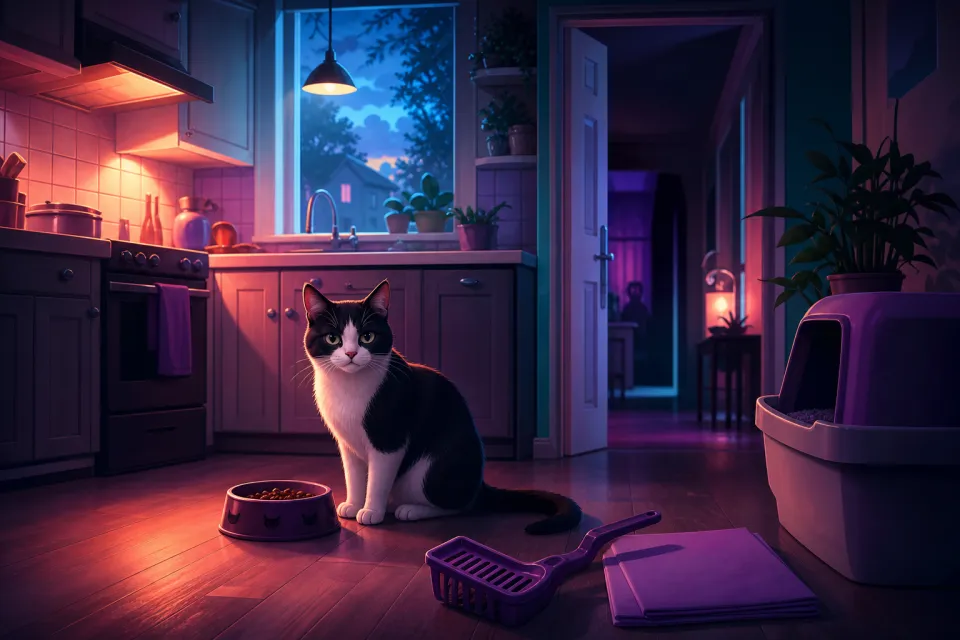
7 Days Cat-Sitting is a horror game disguised as a simple pet-care job. Your starting goal is to look after Whiskers, finish household tasks and get through the week—not just feed a cute cat. The creator’s Roblox description explicitly warns that the job goes wrong and disturbing things happen.
For a first attempt, concentrate on learning the house, completing each task and reading messages before bedtime. This guide keeps specific encounters and solutions in a clearly marked spoiler section. Information was checked on November 1, 2026; follow current in-game prompts when they differ from older walkthroughs.
1. Find the correct Roblox experience
The experience covered here is 7 Days Cat-Sitting by HELP ME PLEASE studios. Its Roblox place ID—the identifying number in its web address—is 116802325837172. Use the direct Roblox listing, then check the creator name before pressing Play.
A similar title or familiar cat thumbnail is not enough to establish that another listing is the same game. Extra words such as “modded,” “roleplay” or “obby” should prompt another check, not an assumption that you have found an official edition.
- Compare both the title and creator, not just the artwork.
- Bookmark the verified listing so you do not have to search again.
- Check a different listing’s content label and purchase options separately.
If the verified page is unavailable, do not assume a similarly named game is its replacement. Check again through Roblox rather than following an unfamiliar download or login link.
2. Your first objectives: learn the daily routine
Read the owner’s phone messages, then make a short tour. Locate the kitchen, food bowl, laundry room, living room, mailbox, front-door lock and bedroom. The community beginner guide recommends learning the ordinary house before experimenting with unusual events. Treat this list as a checklist, not a guaranteed order for every day.
Care for Whiskers
- Feed the cat. Find the cat food in the kitchen storage beside the refrigerator, take it to the bowl and wait for feeding to finish.
- Clean the litter box. Keep the laundry room accessible. When cleanup is available, complete the mini-game by dragging the waste into the bag.
- Finish playtime. Use the living-room laser pointer and keep the dot near Whiskers until the play meter fills.
MrGuider’s chore walkthrough confirms these core responsibilities. The important distinction is completion: touching an object or starting an activity does not necessarily finish it.
Look after yourself and the house
Collect the mail when instructed, return inside, close the front door and use its lock. Prepare your own meal using the refrigerator and microwave, then actually eat it. Feeding Whiskers does not count as feeding yourself.
Before bed, check the refrigerator, cooking appliances and television, and look for unresolved warnings. The recording-based first-nights guide distinguishes preparing dinner from eating it and collecting mail from securing the entrance afterward. Build those paired actions into your routine.
Suggested learning target: finish one careful night before worrying about a perfect seven-day run. A reliable routine is more useful than trying to memorize every possible surprise immediately.
3. Controls: follow the prompts on your device
Desktop walkthroughs show E for object interactions and P for the phone. The first-nights guide cautions that mobile controls can differ. A prompt shown in your current session takes priority over a key mentioned in a video.
| Action | Beginner guidance |
|---|---|
| Move and look | On keyboard and mouse, use WASD to move and the mouse to look around. |
| Interact | Approach the object and use its displayed prompt, commonly E on desktop. |
| Open the phone | Desktop recordings show P. Read new messages rather than dismissing them immediately. |
| Complete mini-games | Use the displayed dragging or aiming controls and watch the completion feedback. |
| Advance the day | Use the bed interaction only after checking your tasks and warnings. |
The community controls reference describes movement, interaction and laser aiming. On touchscreens or controllers, take a moment to identify the equivalent prompts before starting a task. Do not assume every device has identical buttons or support.
4. Common beginner mistakes to avoid
- Sleeping too early. Treat bedtime as the final inspection, not a way to clear unfinished business.
- Stopping at “started.” Wait for feeding, play and eating feedback to finish; complete the litter mini-game rather than closing it early.
- Forgetting the return trip. After collecting mail, make closing and locking the entrance part of the same task.
- Following a video’s day-by-day surprises literally. Community walkthroughs do not establish a dependable encounter schedule for every run.
- Changing everything at once. If something goes wrong, keep the ordinary chores consistent and change one suspected mistake on the next attempt.
Those last two principles are particularly useful in the community first-night guidance: identify the current cue and wait for confirmation rather than frantically trying unrelated actions.
Our suggestion is to keep a small note: “What did I leave unfinished?” That makes a retry a focused experiment instead of another rushed tour. Avoid ending-collection guides until you want deliberate failures; their instructions may intentionally undermine a normal survival attempt.
5. Optional spoilers: encounters and frightening content
Stop here if you want to discover the scares yourself. This section names some events and solutions, but does not describe the final story outcome. Parents can read it privately before deciding whether to allow play.
All Things How’s encounter guide documents distorted faces, threatening figures, bathroom imagery involving blood, and situations requiring the player to hide. That is substantially different from an ordinary animal-care game.
- A tall figure or misplaced object: community walkthroughs describe photographing it with the in-game phone.
- A face at a window: close the affected curtain.
- A “HIDE” warning: move into a back room, close the door and avoid the threat.
Do not apply one solution to everything. Photography, curtains and hiding answer different cues. Wait for the relevant visual change or owner’s response before resuming chores. If this description already sounds uncomfortable, there is no need to test your tolerance by playing.
6. Parent checklist: scares, chat and purchases
A content label is a starting point, not a promise that your child will enjoy the experience. Preview the opening together and agree that leaving is always allowed.
- Check frightening content. Read the current label on the Roblox listing and, if needed, the spoiler section above. Consider your child’s sensitivity to threatening faces, sudden scares and being pursued—not just their age.
- Review access controls. Roblox lets parents manage content maturity and allow or block individual games. Use the parental-controls overview to find the settings available for your child.
- Check chat separately. Review who your child can communicate with rather than assuming a game’s content rating controls social contact. Roblox’s parental-controls page explains communication controls. Agree not to share personal information or follow strangers off-platform.
- Set purchase rules first. Review Robux already on the account and require permission for purchase prompts. Set spending limits and notifications where available. Roblox notes that its monthly limit does not cover gift-card redemption and may not apply on certain consoles; check the spending-control details.
- Agree on a stopping point. Choose a short first session, keep the room comfortable and stop if the child becomes distressed. Finishing the fictional job is never more important than feeling safe.
The best first-session goal is simple: verify the game, learn the chores and decide whether its style of horror is enjoyable. A completed week can wait.
Sources: Roblox, 7-days-cat-sitting.online, mrguider.org, 7days-cat-sitting.wiki, 7dayscatsittingg.wiki, allthings.how
Watch next
 Read next:Minecraft on Switch 2: Free Upgrade and World Transfer Guide
More stories

How to Stay Safe While Playing Roblox R63 Games (2025 Guide)
Discover the most engaging R63-friendly Roblox games in 2025—fashion hubs, roleplay studios, combat arenas, and obbies that make your avatar shine sa…

Best Games You Can Play in Your Browser with Now.gg (2025)
No downloads required. Discover the best game types for Now.gg in 2025 and get performance tips for Chromebooks, Macs, and PCs.

Roblox R63 Avatars: The Complete 2025 Guide (Customization + Safety)
Want to make a Roblox R63 avatar in 2025? Learn how to customize your character, find the best avatar ideas, and stay safe while following the R63 tr…